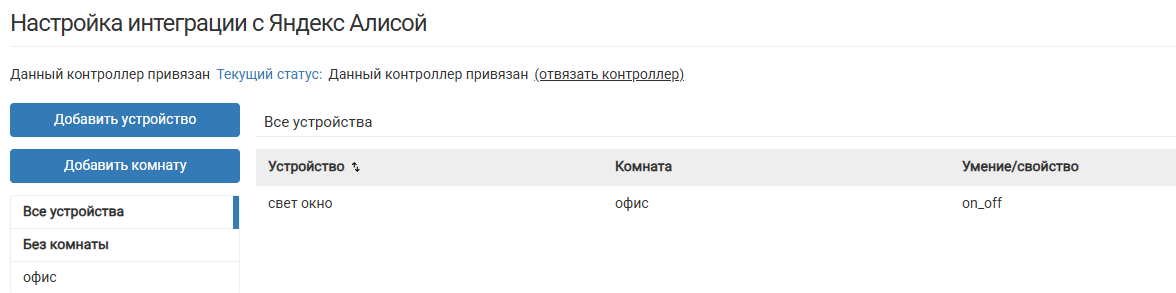
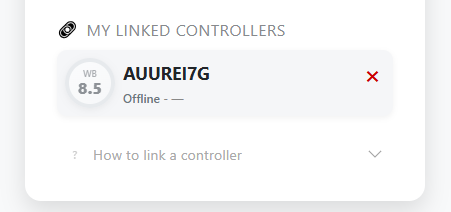
Контроллер привязан, устройства и комнаты есть. Статус Offline и не меняется ни через 30 секунд, ни через полчаса
приложен диагностический архив, доступен только сотрудникам поддержки
(273,6 КБ)
Добрый день.
Подскажите не менялись ли настройки nginx?
Здравствйте. Не менялись
Пришлите пожалуйста конфиги nginx, вот содержимое всех (обоих) конфигов из /etc/nginx/sites-enabled/
Ну и результат выполнения
wget https://alice.wirenboard.com -O -
Также перезапустите сервис wb-mqtt-alice-client.service
Директории /etc/nginx/sites-enabled/ нет, только sites-enabled.default.
/mnt/data/etc/nginx/sites-enabled две символические ссылки:
default:
# Configuration for Wiren Board Homeui web-interface
# Place your custom configuration to /etc/nginx/includes/default.wb.d/*.conf
# Change listen settings in /etc/nginx/includes/default.wb.d/listen.conf

include /usr/share/wb-mqtt-homeui/nginx/default.conf;
и wb-mqtt-alice-proxy:
# NGINX configuration for wb-mqtt-alice proxy
# Important official WebSocket proxying reference:
# https://nginx.org/en/docs/http/websocket.html
#
# This config ensures proper handling of WebSocket connections
# and secure client authentication via ATECCx08 hardware key

server {
    listen 8042;
    server_name localhost;
    access_log /var/log/nginx/wb-mqtt-alice_access.log;
    error_log /var/log/nginx/wb-mqtt-alice_error.log debug;

    location / {
        # Use external DNS to be independent of system settings
        # and prevent problems when there is no internet connection
        resolver 77.88.8.8;

        # Use a variable to prevent NGINX from checking DNS on startup
        set $alice_host "alice.wirenboard.com";

        # Required settings - basic proxy configuration
        proxy_pass https://$alice_host:8042;
        proxy_ssl_name $alice_host;
        proxy_ssl_certificate /var/lib/wb-mqtt-alice/device_bundle.crt.pem;
        proxy_ssl_certificate_key engine:ateccx08:ATECCx08:00:02:C0:00;
        proxy_ssl_server_name on;

        # Specific settings required for WebSocket connections
        proxy_http_version 1.1;
        proxy_set_header Upgrade $http_upgrade;
        proxy_set_header Connection "upgrade";

        # Optional settings - security and performance tuning
        proxy_ssl_trusted_certificate /etc/ssl/certs/ca-certificates.crt;
        proxy_ssl_protocols TLSv1.3;
        proxy_ssl_verify on;

        # Off: use hardware key on every TLS handshake
        #      - slower, ~0.7s per handshake
        #      - some old or non-standard servers may work only with "off"
        # On:  reuse TLS session (hardware key only for first handshake)
        #      - faster, ~0.6s per handshake
        #      - reduces chip load and improves stability
        proxy_ssl_session_reuse off;
    }
}
nginx.conf:
ssl_engine ateccx08;
user www-data;
worker_processes auto;
pid /run/nginx.pid;
include /etc/nginx/modules-enabled/*.conf;

events {
	worker_connections 768;
	# multi_accept on;
}

http {

	##
	# Basic Settings
	##

	sendfile on;
	tcp_nopush on;
	types_hash_max_size 2048;
	# server_tokens off;

	# server_names_hash_bucket_size 64;
	# server_name_in_redirect off;

	include /etc/nginx/mime.types;
	default_type application/octet-stream;

	##
	# SSL Settings
	##

	ssl_protocols TLSv1 TLSv1.1 TLSv1.2 TLSv1.3; # Dropping SSLv3, ref: POODLE
	ssl_prefer_server_ciphers on;

	##
	# Logging Settings
	##

	access_log /var/log/nginx/access.log;
	error_log /var/log/nginx/error.log;

	##
	# Gzip Settings
	##

	gzip on;

	# gzip_vary on;
	# gzip_proxied any;
	# gzip_comp_level 6;
	# gzip_buffers 16 8k;
	# gzip_http_version 1.1;
	# gzip_types text/plain text/css application/json application/javascript text/xml application/xml application/xml+rss text/javascript;

	##
	# Virtual Host Configs
	##

	include /etc/nginx/conf.d/*.conf;
	include /etc/nginx/sites-enabled/*;
}


#mail {
#	# See sample authentication script at:
#	# http://wiki.nginx.org/ImapAuthenticateWithApachePhpScript
#
#	# auth_http localhost/auth.php;
#	# pop3_capabilities "TOP" "USER";
#	# imap_capabilities "IMAP4rev1" "UIDPLUS";
#
#	server {
#		listen     localhost:110;
#		protocol   pop3;
#		proxy      on;
#	}
#
#	server {
#		listen     localhost:143;
#		protocol   imap;
#		proxy      on;
#	}
#}
результат выполнения wget:
root@wirenboard-AUUREI7G:~# wget https://alice.wirenboard.com -O -
--2026-02-12 16:26:07--  https://alice.wirenboard.com/
Resolving alice.wirenboard.com (alice.wirenboard.com)... 176.114.64.20
Connecting to alice.wirenboard.com (alice.wirenboard.com)|176.114.64.20|:443... connected.
HTTP request sent, awaiting response... 200 OK
Length: 1953 (1.9K) [text/html]
Saving to: ‘STDOUT’

-                                      0%[                                                                    ]       0  --.-KB/s               <         !DOCTYPE html>
<html>
  <head>
    <title>Yandex Smart Home Connector</title>
    <meta name="viewport" content="width=device-width, initial-scale=1">
    <link href="https://cdn.jsdelivr.net/npm/bootstrap@5.3.7/dist/css/bootstrap.min.css"
          rel="stylesheet" integrity="sha384-LN+7fdVzj6u52u30Kp6M/trliBMCMKTyK833zpbD+pXdCLuTusPj697FH4R/5mcr"
          crossorigin="anonymous">
    <link href="/static/style.css?v=1"
          rel="stylesheet" >

    <script src="https://cdn.jsdelivr.net/npm/bootstrap@5.3.7/dist/js/bootstrap.bundle.min.js" integrity="sha384-ndDqU0Gzau9qJ1lfW4pNLlhNTkCfHzAV         BReH9diLvGRem5+R9g2FzA8ZGN954O5Q" crossorigin="anonymous"></script>
    <script src="/static/utils.js?v=1"></script>
  </head>
  <body>
    <div class="wb-logo">
      <img class="logo-img"
           src="https://raw.githubusercontent.com/wirenboard/brand/main/logos/logo-horizontal.svg"
           alt="Wiren Board Logo">
    </div>
    <div class="subtitle">
    Yandex Smart Home Connector
    </div>
    <div class="card">

      <div class="card-body">
<h4 class="mb-3">Welcome</h4>
<p class="mb-4 text-muted">Please sign in to continue</p>
<a href="/login" class="yandex-login-button">
  <span class="icon">
    <svg aria-hidden="true" focusable="false" viewBox="0 0 30 30"><circle cx="15" cy="15" r="15" fill="#FC3F1D"></circle><path d="M15.4069 16.549         5C16.2834 18.4695 16.5756 19.1374 16.5756 21.4434V24.5008H13.4451V19.3461L7.53906 6.50084H10.8051L15.4069 16.5495ZM19.2678 6.50084L15.4382 15.203         4H18.6208L22.4608 6.50084H19.2678Z" fill="white"></path></svg>
  </span>
  Sign in with Yandex ID
</a>
</div>
    </div>
    <div class="footer-note">
      Web interface for linking your
      <a href="https://wirenboard.com" target="_blank">
        Wiren Board
      </a>
      controllers<br>to
      <a href="https://alice.yandex.ru/smart-home" target="_blank">
        Yandex Smart Home
      </a>
    </div>
  </body>
-                                    100%[===================================================================>]   1.91K  --.-KB/s    in 0s

2026-02-12 16:26:07 (10.4 MB/s) - written to stdout [1953/1953]
Все в порядке. Но в логах wb-mqtt-alice-client
Feb 12 11:29:36 wirenboard-AUUREI7G python3[17299]: INFO: Connecting Socket.IO client to 'http://localhost:8042'...
Проверьте пожалуйста
wget https://localhost:8042 -O -
root@wirenboard-AUUREI7G:~# wget https://localhost:8042 -O -
--2026-02-12 16:44:47--  https://localhost:8042/
Resolving localhost (localhost)... 127.0.0.1, ::1
Connecting to localhost (localhost)|127.0.0.1|:8042... connected.
GnuTLS: An unexpected TLS packet was received.
Unable to establish SSL connection.
Добрый день.
Возникала ли снова проблема соединения?
Добрый день. Оказалось, проблема в сети. Диагностируется с помощью tracert в cmd или подобных команд в других терминалах. В качестве временного решения показало свою эффективность первичное подключение к серверу интеграции через другую сеть и затем смена интерфейса на основной – дальше соединение обычно не обрывается.