Так туда и указано. На этом разделе, корневом - нет места под контейнеру. Укажите верное расположение.
Верное это какое?
#root = “/var/lib/containerd”
вот так должно быть?
Вы показываете закомментированную строку.
То есть если строка (сейчас) закомментирована - то значение используется по-умолчанию.
Вы (зачем-то) конфигурируете отдельно параметр root для docker.
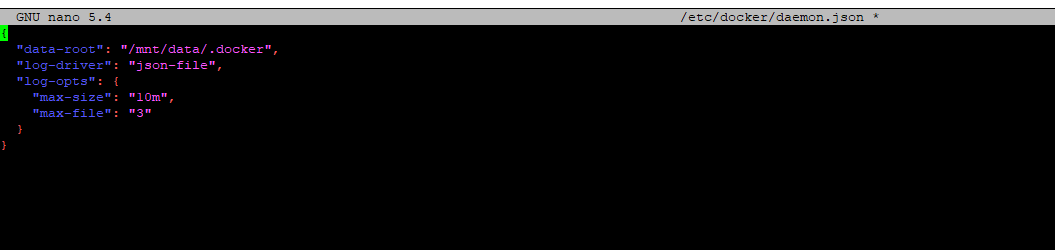
Пожалуйста проверьте снова вот это
Перенесите директорию:
mv -v /mnt/containerd-data /mnt/data/
Исправьте в /etc/containerd/config.toml:
root = "/mnt/containerd-data"
на
root = "/mnt/data/containerd-data"
Перезапустите сервис containerd.
Пробуйте повторно установить home assistant
У меня что-то создается впечатлениие что сначала конфиг для docker был создан после запуска самого сервиса. Потом он был изменен - но выбрано расположение “/var/lib/containerd”.
Если говорить про документацию - то конфиг должен точно ей соответствовать.
@Aleksandr_Cheusov совершенно прав.
Какая-то проблема еще требует решения?
Home assistant установился после того как я выполнил данное:
root = "/mnt/data/containerd-data"
Перезапустите сервис containerd.
Пробуйте повторно установить home assistant
но после сброса устройства к заводским настройками все повторяется и без данной корректировки Home Assistant не устанавливается по инструкциям.
Вот порядок установки с чистого устройства:
login as: root
root@192.168.95.20’s password:
Access denied
root@192.168.95.20’s password:
_ _ _
__ ()_ __ ___ _ __ | |__ ___ __ _ _ __ | |
\ \ /\ / / | '/ _ \ '_ | '_ \ / _ \ / | '__/ _ |
\ V V /| | | | __/ | | | |) | () | (| | | | (| |
_/_/ ||| ___|| ||./ _/ _,|| _,_|
Welcome to Wiren Board 8.5.3 (s/n AL7Y53UV), release wb-2507 (as stable)
Linux wirenboard-AL7Y53UV 6.8.0-wb140 #1 SMP Fri Jul 18 08:08:05 UTC 2025 aarch64 GNU/Linux
System load: 0.41 0.54 0.25 Up time: 3 min
Memory usage: 6% of 3.84G Usage of /: 41% of 2.0G /mnt/data: 1% of 55G
eth0 ip: 192.168.95.20
root@wirenboard-AL7Y53UV:~# apt update && apt upgrade -y
Get:1 Index of /debian bullseye InRelease [75.1 kB]
Get:3 Index of /debian bullseye-updates InRelease [44.0 kB]
Get:4 Index of /debian-security bullseye-security InRelease [27.2 kB]
Get:2 https://deb.wirenboard.com/wb8/bullseye stable InRelease [7,170 B]
Get:5 Index of /debian bullseye/main armhf Packages [7,841 kB]
Get:6 Index of /debian bullseye/main arm64 Packages [7,955 kB]
Get:7 https://deb.wirenboard.com/wb8/bullseye stable/main armhf Packages [45.1 kB]
Get:8 Index of /debian bullseye/main Translation-en [6,235 kB]
Get:9 https://deb.wirenboard.com/wb8/bullseye stable/main arm64 Packages [44.8 kB]
Get:10 Index of /debian bullseye-updates/main arm64 Packages [16.3 kB]
Get:11 Index of /debian bullseye-updates/main armhf Packages [16.3 kB]
Get:12 Index of /debian bullseye-updates/main Translation-en [10.5 kB]
Get:13 Index of /debian-security bullseye-security/main arm64 Packages [420 kB]
Get:14 Index of /debian-security bullseye-security/main armhf Packages [416 kB]
Get:15 Index of /debian-security bullseye-security/main Translation-en [282 kB]
Fetched 23.4 MB in 12s (1,932 kB/s)
Reading package lists… Done
Building dependency tree… Done
Reading state information… Done
All packages are up to date.
Reading package lists… Done
Building dependency tree… Done
Reading state information… Done
Calculating upgrade… Done
0 upgraded, 0 newly installed, 0 to remove and 0 not upgraded.
root@wirenboard-AL7Y53UV:~# apt update && apt install ca-certificates curl gnupg lsb-release iptables
Hit:1 Index of /debian bullseye InRelease
Hit:2 Index of /debian bullseye-updates InRelease
Hit:3 Index of /debian-security bullseye-security InRelease
Hit:4 https://deb.wirenboard.com/wb8/bullseye stable InRelease
Reading package lists… Done
Building dependency tree… Done
Reading state information… Done
All packages are up to date.
Reading package lists… Done
Building dependency tree… Done
Reading state information… Done
ca-certificates is already the newest version (20210119).
curl is already the newest version (7.74.0-1.3+deb11u15).
curl set to manually installed.
The following additional packages will be installed:
dirmngr distro-info-data gnupg-l10n gnupg-utils gpg gpg-agent gpg-wks-client gpg-wks-server gpgconf gpgsm libassuan0 libip6tc2 libksba8 libnpth0 pinentry-curses
Suggested packages:
dbus-user-session pinentry-gnome3 tor parcimonie xloadimage scdaemon firewalld pinentry-doc
The following NEW packages will be installed:
dirmngr distro-info-data gnupg gnupg-l10n gnupg-utils gpg gpg-agent gpg-wks-client gpg-wks-server gpgconf gpgsm iptables libassuan0 libip6tc2 libksba8 libnpth0 lsb-release
pinentry-curses
0 upgraded, 18 newly installed, 0 to remove and 0 not upgraded.
Need to get 7,929 kB of archives.
After this operation, 17.8 MB of additional disk space will be used.
Do you want to continue? [Y/n] y
Get:1 Index of /debian bullseye/main arm64 libassuan0 arm64 2.5.3-7.1 [48.0 kB]
Get:2 Index of /debian bullseye/main arm64 gpgconf arm64 2.2.27-2+deb11u2 [540 kB]
Get:3 Index of /debian bullseye/main arm64 libksba8 arm64 1.5.0-3+deb11u2 [115 kB]
Get:4 Index of /debian bullseye/main arm64 libnpth0 arm64 1.6-3 [18.6 kB]
Get:5 Index of /debian bullseye/main arm64 dirmngr arm64 2.2.27-2+deb11u2 [743 kB]
Get:6 Index of /debian-security bullseye-security/main arm64 distro-info-data all 0.51+deb11u10 [8,684 B]
Get:7 Index of /debian bullseye/main arm64 gnupg-l10n all 2.2.27-2+deb11u2 [1,086 kB]
Get:8 Index of /debian bullseye/main arm64 gnupg-utils arm64 2.2.27-2+deb11u2 [864 kB]
Get:9 Index of /debian bullseye/main arm64 gpg arm64 2.2.27-2+deb11u2 [884 kB]
Get:10 Index of /debian bullseye/main arm64 pinentry-curses arm64 1.1.0-4 [63.0 kB]
Get:11 Index of /debian bullseye/main arm64 gpg-agent arm64 2.2.27-2+deb11u2 [651 kB]
Get:12 Index of /debian bullseye/main arm64 gpg-wks-client arm64 2.2.27-2+deb11u2 [517 kB]
Get:13 Index of /debian bullseye/main arm64 gpg-wks-server arm64 2.2.27-2+deb11u2 [510 kB]
Get:14 Index of /debian bullseye/main arm64 gpgsm arm64 2.2.27-2+deb11u2 [627 kB]
Get:15 Index of /debian bullseye/main arm64 gnupg all 2.2.27-2+deb11u2 [825 kB]
Get:16 Index of /debian bullseye/main arm64 libip6tc2 arm64 1.8.7-1 [34.3 kB]
Get:17 Index of /debian bullseye/main arm64 iptables arm64 1.8.7-1 [368 kB]
Get:18 Index of /debian bullseye/main arm64 lsb-release all 11.1.0 [27.9 kB]
Fetched 7,929 kB in 1s (7,069 kB/s)
Selecting previously unselected package libassuan0:arm64.
(Reading database … 30703 files and directories currently installed.)
Preparing to unpack …/00-libassuan0_2.5.3-7.1_arm64.deb …
Unpacking libassuan0:arm64 (2.5.3-7.1) …
Selecting previously unselected package gpgconf.
Preparing to unpack …/01-gpgconf_2.2.27-2+deb11u2_arm64.deb …
Unpacking gpgconf (2.2.27-2+deb11u2) …
Selecting previously unselected package libksba8:arm64.
Preparing to unpack …/02-libksba8_1.5.0-3+deb11u2_arm64.deb …
Unpacking libksba8:arm64 (1.5.0-3+deb11u2) …
Selecting previously unselected package libnpth0:arm64.
Preparing to unpack …/03-libnpth0_1.6-3_arm64.deb …
Unpacking libnpth0:arm64 (1.6-3) …
Selecting previously unselected package dirmngr.
Preparing to unpack …/04-dirmngr_2.2.27-2+deb11u2_arm64.deb …
Unpacking dirmngr (2.2.27-2+deb11u2) …
Selecting previously unselected package distro-info-data.
Preparing to unpack …/05-distro-info-data_0.51+deb11u10_all.deb …
Unpacking distro-info-data (0.51+deb11u10) …
Selecting previously unselected package gnupg-l10n.
Preparing to unpack …/06-gnupg-l10n_2.2.27-2+deb11u2_all.deb …
Unpacking gnupg-l10n (2.2.27-2+deb11u2) …
Selecting previously unselected package gnupg-utils.
Preparing to unpack …/07-gnupg-utils_2.2.27-2+deb11u2_arm64.deb …
Unpacking gnupg-utils (2.2.27-2+deb11u2) …
Selecting previously unselected package gpg.
Preparing to unpack …/08-gpg_2.2.27-2+deb11u2_arm64.deb …
Unpacking gpg (2.2.27-2+deb11u2) …
Selecting previously unselected package pinentry-curses.
Preparing to unpack …/09-pinentry-curses_1.1.0-4_arm64.deb …
Unpacking pinentry-curses (1.1.0-4) …
Selecting previously unselected package gpg-agent.
Preparing to unpack …/10-gpg-agent_2.2.27-2+deb11u2_arm64.deb …
Unpacking gpg-agent (2.2.27-2+deb11u2) …
Selecting previously unselected package gpg-wks-client.
Preparing to unpack …/11-gpg-wks-client_2.2.27-2+deb11u2_arm64.deb …
Unpacking gpg-wks-client (2.2.27-2+deb11u2) …
Selecting previously unselected package gpg-wks-server.
Preparing to unpack …/12-gpg-wks-server_2.2.27-2+deb11u2_arm64.deb …
Unpacking gpg-wks-server (2.2.27-2+deb11u2) …
Selecting previously unselected package gpgsm.
Preparing to unpack …/13-gpgsm_2.2.27-2+deb11u2_arm64.deb …
Unpacking gpgsm (2.2.27-2+deb11u2) …
Selecting previously unselected package gnupg.
Preparing to unpack …/14-gnupg_2.2.27-2+deb11u2_all.deb …
Unpacking gnupg (2.2.27-2+deb11u2) …
Selecting previously unselected package libip6tc2:arm64.
Preparing to unpack …/15-libip6tc2_1.8.7-1_arm64.deb …
Unpacking libip6tc2:arm64 (1.8.7-1) …
Selecting previously unselected package iptables.
Preparing to unpack …/16-iptables_1.8.7-1_arm64.deb …
Unpacking iptables (1.8.7-1) …
Selecting previously unselected package lsb-release.
Preparing to unpack …/17-lsb-release_11.1.0_all.deb …
Unpacking lsb-release (11.1.0) …
Setting up libksba8:arm64 (1.5.0-3+deb11u2) …
Setting up libip6tc2:arm64 (1.8.7-1) …
Setting up distro-info-data (0.51+deb11u10) …
Setting up libnpth0:arm64 (1.6-3) …
Setting up libassuan0:arm64 (2.5.3-7.1) …
Setting up gnupg-l10n (2.2.27-2+deb11u2) …
Setting up gpgconf (2.2.27-2+deb11u2) …
Setting up lsb-release (11.1.0) …
Setting up gpg (2.2.27-2+deb11u2) …
Setting up gnupg-utils (2.2.27-2+deb11u2) …
Setting up pinentry-curses (1.1.0-4) …
Setting up gpg-agent (2.2.27-2+deb11u2) …
Created symlink /etc/systemd/user/sockets.target.wants/gpg-agent-browser.socket → /usr/lib/systemd/user/gpg-agent-browser.socket.
Created symlink /etc/systemd/user/sockets.target.wants/gpg-agent-extra.socket → /usr/lib/systemd/user/gpg-agent-extra.socket.
Created symlink /etc/systemd/user/sockets.target.wants/gpg-agent-ssh.socket → /usr/lib/systemd/user/gpg-agent-ssh.socket.
Created symlink /etc/systemd/user/sockets.target.wants/gpg-agent.socket → /usr/lib/systemd/user/gpg-agent.socket.
Setting up iptables (1.8.7-1) …
update-alternatives: using /usr/sbin/iptables-legacy to provide /usr/sbin/iptables (iptables) in auto mode
update-alternatives: using /usr/sbin/ip6tables-legacy to provide /usr/sbin/ip6tables (ip6tables) in auto mode
update-alternatives: using /usr/sbin/iptables-nft to provide /usr/sbin/iptables (iptables) in auto mode
update-alternatives: using /usr/sbin/ip6tables-nft to provide /usr/sbin/ip6tables (ip6tables) in auto mode
update-alternatives: using /usr/sbin/arptables-nft to provide /usr/sbin/arptables (arptables) in auto mode
update-alternatives: using /usr/sbin/ebtables-nft to provide /usr/sbin/ebtables (ebtables) in auto mode
Setting up gpgsm (2.2.27-2+deb11u2) …
Setting up dirmngr (2.2.27-2+deb11u2) …
Created symlink /etc/systemd/user/sockets.target.wants/dirmngr.socket → /usr/lib/systemd/user/dirmngr.socket.
Setting up gpg-wks-server (2.2.27-2+deb11u2) …
Setting up gpg-wks-client (2.2.27-2+deb11u2) …
Setting up gnupg (2.2.27-2+deb11u2) …
Processing triggers for libc-bin (2.31-13+deb11u13) …
root@wirenboard-AL7Y53UV:~# echo “deb [arch=$(dpkg --print-architecture) signed-by=/usr/share/keyrings/docker-archive-keyring.gpg] Index of linux/debian/ $(lsb_release -cs) stable” | tee /etc/apt/sources.list.d/docker.list > /dev/null
root@wirenboard-AL7Y53UV:~# curl -fsSL https://download.docker.com/linux/debian/gpg | gpg --dearmor -o /usr/share/keyrings/docker-archive-keyring.gpg
root@wirenboard-AL7Y53UV:~# update-alternatives --set iptables /usr/sbin/iptables-legacy
update-alternatives --set ip6tables /usr/sbin/ip6tables-legacy
update-alternatives: using /usr/sbin/iptables-legacy to provide /usr/sbin/iptables (iptables) in manual mode
update-alternatives: using /usr/sbin/ip6tables-legacy to provide /usr/sbin/ip6tables (ip6tables) in manual mode
root@wirenboard-AL7Y53UV:~# mkdir /mnt/data/etc/docker && ln -s /mnt/data/etc/docker /etc/docker
root@wirenboard-AL7Y53UV:~# mkdir /mnt/data/.docker
root@wirenboard-AL7Y53UV:~# nano /etc/docker/daemon.json
root@wirenboard-AL7Y53UV:~# apt update && apt install docker-ce docker-ce-cli containerd.io
Hit:2 Index of /debian bullseye InRelease
Hit:3 Index of /debian bullseye-updates InRelease
Hit:4 Index of /debian-security bullseye-security InRelease
Get:5 Index of linux/debian/ bullseye InRelease [43.0 kB]
Hit:1 https://deb.wirenboard.com/wb8/bullseye stable InRelease
Get:6 Index of linux/debian/ bullseye/stable arm64 Packages [68.2 kB]
Fetched 111 kB in 3s (40.1 kB/s)
Reading package lists… Done
Building dependency tree… Done
Reading state information… Done
All packages are up to date.
Reading package lists… Done
Building dependency tree… Done
Reading state information… Done
The following additional packages will be installed:
apparmor dbus-user-session docker-buildx-plugin docker-ce-rootless-extras docker-compose-plugin git git-man liberror-perl libslirp0 patch slirp4netns
Suggested packages:
apparmor-profiles-extra apparmor-utils cgroupfs-mount | cgroup-lite docker-model-plugin gettext-base git-daemon-run | git-daemon-sysvinit git-doc git-el git-email git-gui gitk
gitweb git-cvs git-mediawiki git-svn ed diffutils-doc
The following NEW packages will be installed:
apparmor containerd.io dbus-user-session docker-buildx-plugin docker-ce docker-ce-cli docker-ce-rootless-extras docker-compose-plugin git git-man liberror-perl libslirp0 patch
slirp4netns
0 upgraded, 14 newly installed, 0 to remove and 0 not upgraded.
Need to get 91.8 MB of archives.
After this operation, 423 MB of additional disk space will be used.
Do you want to continue? [Y/n] y
Get:1 Index of /debian bullseye/main arm64 apparmor arm64 2.13.6-10 [601 kB]
Get:2 Index of /debian bullseye/main arm64 dbus-user-session arm64 1.12.28-0+deb11u1 [100 kB]
Get:3 Index of /debian bullseye/main arm64 liberror-perl all 0.17029-1 [31.0 kB]
Get:4 Index of /debian-security bullseye-security/main arm64 git-man all 1:2.30.2-1+deb11u5 [1,831 kB]
Get:5 Index of /debian-security bullseye-security/main arm64 git arm64 1:2.30.2-1+deb11u5 [5,480 kB]
Get:9 Index of linux/debian/ bullseye/stable arm64 containerd.io arm64 2.1.5-1~debian.11~bullseye [19.3 MB]
Get:6 Index of /debian bullseye/main arm64 libslirp0 arm64 4.4.0-1+deb11u2 [54.0 kB]
Get:7 Index of /debian bullseye/main arm64 patch arm64 2.7.6-7 [121 kB]
Get:8 Index of /debian bullseye/main arm64 slirp4netns arm64 1.0.1-2 [32.4 kB]
Get:10 Index of linux/debian/ bullseye/stable arm64 docker-ce-cli arm64 5:29.0.4-1~debian.11~bullseye [14.7 MB]
Get:11 Index of linux/debian/ bullseye/stable arm64 docker-ce arm64 5:29.0.4-1~debian.11~bullseye [17.5 MB]
Get:12 Index of linux/debian/ bullseye/stable arm64 docker-buildx-plugin arm64 0.30.0-1~debian.11~bullseye [14.1 MB]
Get:13 Index of linux/debian/ bullseye/stable arm64 docker-ce-rootless-extras arm64 5:29.0.4-1~debian.11~bullseye [5,651 kB]
Get:14 Index of linux/debian/ bullseye/stable arm64 docker-compose-plugin arm64 2.40.3-1~debian.11~bullseye [12.3 MB]
Fetched 91.8 MB in 10s (9,232 kB/s)
Preconfiguring packages …
Selecting previously unselected package containerd.io.
(Reading database … 31184 files and directories currently installed.)
Preparing to unpack …/00-containerd.io_2.1.5-1~debian.11~bullseye_arm64.deb …
Unpacking containerd.io (2.1.5-1~debian.11~bullseye) …
Selecting previously unselected package docker-ce-cli.
Preparing to unpack …/01-docker-ce-cli_5%3a29.0.4-1~debian.11~bullseye_arm64.deb …
Unpacking docker-ce-cli (5:29.0.4-1~debian.11~bullseye) …
Selecting previously unselected package docker-ce.
Preparing to unpack …/02-docker-ce_5%3a29.0.4-1~debian.11~bullseye_arm64.deb …
Unpacking docker-ce (5:29.0.4-1~debian.11~bullseye) …
Selecting previously unselected package apparmor.
Preparing to unpack …/03-apparmor_2.13.6-10_arm64.deb …
Unpacking apparmor (2.13.6-10) …
Selecting previously unselected package dbus-user-session.
Preparing to unpack …/04-dbus-user-session_1.12.28-0+deb11u1_arm64.deb …
Unpacking dbus-user-session (1.12.28-0+deb11u1) …
Selecting previously unselected package docker-buildx-plugin.
Preparing to unpack …/05-docker-buildx-plugin_0.30.0-1~debian.11~bullseye_arm64.deb …
Unpacking docker-buildx-plugin (0.30.0-1~debian.11~bullseye) …
Selecting previously unselected package docker-ce-rootless-extras.
Preparing to unpack …/06-docker-ce-rootless-extras_5%3a29.0.4-1~debian.11~bullseye_arm64.deb …
Unpacking docker-ce-rootless-extras (5:29.0.4-1~debian.11~bullseye) …
Selecting previously unselected package docker-compose-plugin.
Preparing to unpack …/07-docker-compose-plugin_2.40.3-1~debian.11~bullseye_arm64.deb …
Unpacking docker-compose-plugin (2.40.3-1~debian.11~bullseye) …
Selecting previously unselected package liberror-perl.
Preparing to unpack …/08-liberror-perl_0.17029-1_all.deb …
Unpacking liberror-perl (0.17029-1) …
Selecting previously unselected package git-man.
Preparing to unpack …/09-git-man_1%3a2.30.2-1+deb11u5_all.deb …
Unpacking git-man (1:2.30.2-1+deb11u5) …
Selecting previously unselected package git.
Preparing to unpack …/10-git_1%3a2.30.2-1+deb11u5_arm64.deb …
Unpacking git (1:2.30.2-1+deb11u5) …
Selecting previously unselected package libslirp0:arm64.
Preparing to unpack …/11-libslirp0_4.4.0-1+deb11u2_arm64.deb …
Unpacking libslirp0:arm64 (4.4.0-1+deb11u2) …
Selecting previously unselected package patch.
Preparing to unpack …/12-patch_2.7.6-7_arm64.deb …
Unpacking patch (2.7.6-7) …
Selecting previously unselected package slirp4netns.
Preparing to unpack …/13-slirp4netns_1.0.1-2_arm64.deb …
Unpacking slirp4netns (1.0.1-2) …
Setting up liberror-perl (0.17029-1) …
Setting up apparmor (2.13.6-10) …
Created symlink /etc/systemd/system/sysinit.target.wants/apparmor.service → /lib/systemd/system/apparmor.service.
Setting up dbus-user-session (1.12.28-0+deb11u1) …
Setting up docker-buildx-plugin (0.30.0-1~debian.11~bullseye) …
Setting up containerd.io (2.1.5-1~debian.11~bullseye) …
Created symlink /etc/systemd/system/multi-user.target.wants/containerd.service → /lib/systemd/system/containerd.service.
Setting up patch (2.7.6-7) …
Setting up docker-compose-plugin (2.40.3-1~debian.11~bullseye) …
Setting up docker-ce-cli (5:29.0.4-1~debian.11~bullseye) …
Setting up libslirp0:arm64 (4.4.0-1+deb11u2) …
Setting up git-man (1:2.30.2-1+deb11u5) …
Setting up docker-ce-rootless-extras (5:29.0.4-1~debian.11~bullseye) …
Setting up slirp4netns (1.0.1-2) …
Setting up docker-ce (5:29.0.4-1~debian.11~bullseye) …
Created symlink /etc/systemd/system/multi-user.target.wants/docker.service → /lib/systemd/system/docker.service.
Created symlink /etc/systemd/system/sockets.target.wants/docker.socket → /lib/systemd/system/docker.socket.
Setting up git (1:2.30.2-1+deb11u5) …
Processing triggers for libc-bin (2.31-13+deb11u13) …
root@wirenboard-AL7Y53UV:~# docker run hello-world
Unable to find image ‘hello-world:latest’ locally
latest: Pulling from library/hello-world
198f93fd5094: Pull complete
Digest: sha256:f7931603f70e13dbd844253370742c4fc4202d290c80442b2e68706d8f33ce26
Status: Downloaded newer image for hello-world:latest
Hello from Docker!
This message shows that your installation appears to be working correctly.
To generate this message, Docker took the following steps:
- The Docker client contacted the Docker daemon.
- The Docker daemon pulled the “hello-world” image from the Docker Hub.
(arm64v8) - The Docker daemon created a new container from that image which runs the
executable that produces the output you are currently reading. - The Docker daemon streamed that output to the Docker client, which sent it
to your terminal.
To try something more ambitious, you can run an Ubuntu container with:
$ docker run -it ubuntu bash
Share images, automate workflows, and more with a free Docker ID:
https://hub.docker.com/
For more examples and ideas, visit:
https://docs.docker.com/get-started/
root@wirenboard-AL7Y53UV:~# mkdir -p /mnt/data/.docker-compose/home-assistant
root@wirenboard-AL7Y53UV:~# cd /mnt/data/.docker-compose/home-assistant
root@wirenboard-AL7Y53UV:/mnt/data/.docker-compose/home-assistant# mkdir -p config/home-assistant
mkdir -p store/media
root@wirenboard-AL7Y53UV:/mnt/data/.docker-compose/home-assistant# nano docker-compose.yaml
root@wirenboard-AL7Y53UV:/mnt/data/.docker-compose/home-assistant# echo “MYTZ=Europe/Moscow” >> .env
root@wirenboard-AL7Y53UV:/mnt/data/.docker-compose/home-assistant# docker compose up -d
[+] Running 26/29
⠏ homeassistant [⣿⣿⣿⣿⣿⣿⣿⣿⣿⣿⣿⣿⣀⣿⣿⣿⣿⣿⣿⣿⣿⣿⣿⣿⣿⣿⣿⣿] 390.8MB / 681.6MB Pulling 38.0s
 8c13f76486e2 Pull complete 4.8s
7122488a7b76 Pull complete 4.9s
6b59a28fa201 Pull complete 3.1s
32e02b208514 Download complete 0.7s
32f48ec0eab5 Pull complete 1.4s
8bc69f822830 Pull complete 3.2s
d89cc92c5b3d Pull complete 0.7s
ae9d5f00cdc8 Pull complete 15.9s
7d2d0fe10f5b Pull complete 0.9s
80be49c06019 Download complete 0.9s
941090830e15 Pull complete 0.9s
b84b516ad569 Pull complete 28.9s
⠦ 7245943fc3f1 Downloading [=================> ] 157.3MB/448MB 35.6s
eb6ba507c876 Pull complete 2.3s
5812cfef0a71 Pull complete 31.4s
631122f643a8 Download complete 24.6s
117ca63765f3 Pull complete 0.8s
ae6f9a5f81c7 Download complete 6.5s
4f4fb700ef54 Pull complete 1.1s
ef5b0bee626b Pull complete 16.8s
⠦ 22d21bc2e7c6 Extracting 4 s 35.6s
363f208a6ede Pull complete 31.5s
73606726d0e3 Pull complete 25.1s
61ed823bd593 Pull complete 28.0s
5687b99cbc4d Pull complete 3.1s
3464428035b6 Pull complete 1.0s
32f44e3c5dca Pull complete 28.6s
e0b175c360b6 Pull complete 28.7s
failed to extract layer (application/vnd.docker.image.rootfs.diff.tar.gzip sha256:22d21bc2e7c66f3ad5909c9ab42d8c206ae2b727e18b50e99e8df5830931686d) to overlayfs as “extract-715370834-kbEo sha256:72a43b4453fc5bc640bffd1817569fc3cc7e7cb4dbdc55a36a4f0267ea37e02c”: write /var/lib/containerd/io.containerd.snapshotter.v1.overlayfs/snapshots/27/fs/usr/local/lib/python3.13/site-packages/cryptography/hazmat/bindings/_rust.abi3.so: no space left on device
Значит проблема решена. Осталось немного инструкцию поправить.
вот эта команда не сработала
скажите пожалуйста в каком месте и что вы поправите инструкции, хотелось бы установить без ручной правки.
Я не вижу тут создания конфига для docker
Иными словами - годе, в каком месте вы указываете каталог для размещения контейнеров.
Так помогла или нет команда?

вы про эту команду?
Это единственное что я сделал и все устанавливается

А вот ввод команды и результат:
root@wirenboard-AL7Y53UV:/mnt/data/.docker-compose/home-assistant# mv -v /mnt/containerd-data /mnt/data/
mv: cannot stat ‘/mnt/containerd-data’: No such file or directory
Так мы к этой команде пришли несколькими шагами
все равно она не сработала, по этому я поправил только файл config.toml
и все заработало
Вероятно, что containerd создал нужную директорию, раз она была в его конфигурации. Контейнер рантайм я не копал в эту сторону, так как ни к чему.
подскажите на будущее что надо поправить в инструкции, чтоб было все без ручной правки этого файла?
Посмотрел у себя. При правильно написанном конфиге /etc/docker/daemon.json дополнительных параметров не требуется.
А для чего?
Я проверил: установил docker, запустил контейнер. Контейнер сохранился в определенное параметром “data-root” место.
Ну и документация - это просто памятка, она не требует совершенно точного выполнения. Единственное условие - понимание результата выполнения команд и значений в конфигах.
вот и мне кажется что с данным контроллером что-то не так, так как у меня есть еще один, и таких проблем не было.