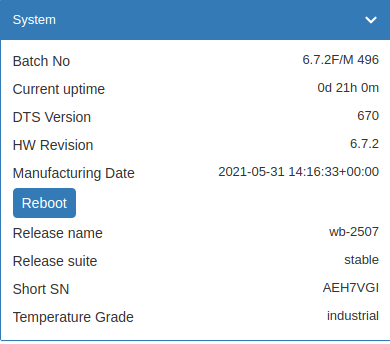
Помогите пожалуйста настроить Modbus TCP/IP. Устройство капризное, не хочет чтобы пулинг был чаще чем 1 раз в сек, также страдает длительными паузами при ответах. Хочется чтобы была возможность работать с ним, скорость не имеет никакого значения, чтобы wirenbord переподключался к нему по tcp после Connection refused . Лог ниже. Заранее огромное спасибо
06-01-2026 16:02:30.033 [wb-mqtt-serial]	ERROR: [serial client] Serial protocol error: <172.25.0.99:502> connect error: Connection refused (111)
06-01-2026 16:02:29.014 [wb-mqtt-serial]	WARNING: <172.25.0.99:502>: closed due to repetitive errors
06-01-2026 16:02:28.996 [wb-mqtt-serial]	WARNING: [serial device] device modbus-tcp:99 is disconnected
06-01-2026 16:02:28.996 [wb-mqtt-serial]	WARNING: [modbus] failed to read 1 holding(s) @ 910 of device modbus-tcp:99: Serial protocol error: request timed out
06-01-2026 16:02:27.474 [wb-mqtt-serial]	WARNING: [modbus] failed to read 1 holding(s) @ 909 of device modbus-tcp:99: Serial protocol error: request timed out
06-01-2026 16:02:03.504 [wb-mqtt-serial]	WARNING: [modbus] failed to read 1 holding(s) @ 910 of device modbus-tcp:99: Serial protocol error: request timed out
06-01-2026 16:01:52.804 [wb-mqtt-serial]	WARNING: [modbus] failed to read 1 holding(s) @ 1 of device modbus-tcp:99: Serial protocol error: request timed out
06-01-2026 16:01:43.943 [wb-mqtt-serial]	WARNING: [modbus] failed to read 1 holding(s) @ 901 of device modbus-tcp:99: Serial protocol error: request timed out
06-01-2026 16:01:41.403 [wb-mqtt-serial]	WARNING: [modbus] failed to read 1 holding(s) @ 3 of device modbus-tcp:99: Serial protocol error: request timed out
06-01-2026 16:01:38.863 [wb-mqtt-serial]	WARNING: [modbus] failed to read 1 holding(s) @ 1 of device modbus-tcp:99: Serial protocol error: request timed out
06-01-2026 16:01:23.064 [wb-mqtt-serial]	WARNING: [modbus] failed to read 1 holding(s) @ 909 of device modbus-tcp:99: Serial protocol error: request timed out
06-01-2026 16:00:59.635 [wb-mqtt-serial]	WARNING: [modbus] failed to read 1 holding(s) @ 0 of device modbus-tcp:99: Serial protocol error: request timed out
06-01-2026 16:00:37.705 [wb-mqtt-serial]	WARNING: [modbus] failed to read 1 holding(s) @ 3 of device modbus-tcp:99: Serial protocol error: socket closed
06-01-2026 16:00:32.626 [wb-mqtt-serial]	WARNING: [modbus] failed to read 1 holding(s) @ 909 of device modbus-tcp:99: Serial protocol error: request timed out
06-01-2026 16:00:30.085 [wb-mqtt-serial]	WARNING: [modbus] failed to read 2 holding(s) @ 905 of device modbus-tcp:99: Serial protocol error: request timed out
06-01-2026 16:00:11.057 [wb-mqtt-serial]	WARNING: [modbus] failed to read 1 holding(s) @ 2 of device modbus-tcp:99: Serial protocol error: request timed out
06-01-2026 16:00:02.399 [wb-mqtt-serial]	WARNING: [modbus] failed to read 1 holding(s) @ 902 of device modbus-tcp:99: Serial protocol error: request timed out
06-01-2026 15:59:55.585 [wb-mqtt-serial]	WARNING: [modbus] failed to read 1 holding(s) @ 0 of device modbus-tcp:99: Serial protocol error: request timed out
06-01-2026 15:59:39.576 [wb-mqtt-serial]	WARNING: [modbus] failed to read 2 holding(s) @ 907 of device modbus-tcp:99: Serial protocol error: request timed out
06-01-2026 15:59:30.916 [wb-mqtt-serial]	WARNING: [modbus] failed to read 1 holding(s) @ 1 of device modbus-tcp:99: Serial protocol error: request timed out
06-01-2026 15:59:27.357 [wb-mqtt-serial]	WARNING: [modbus] failed to read 1 holding(s) @ 909 of device modbus-tcp:99: Serial protocol error: request timed out
06-01-2026 15:59:22.777 [wb-mqtt-serial]	WARNING: [modbus] failed to read 1 holding(s) @ 902 of device modbus-tcp:99: Serial protocol error: request timed out
06-01-2026 15:59:11.887 [wb-mqtt-serial]	WARNING: [modbus] failed to read 2 holding(s) @ 905 of device modbus-tcp:99: Serial protocol error: request timed out
06-01-2026 15:58:58.137 [wb-mqtt-serial]	WARNING: [modbus] failed to read 1 holding(s) @ 903 of device modbus-tcp:99: Serial protocol error: request timed out
06-01-2026 15:58:54.578 [wb-mqtt-serial]	WARNING: [modbus] failed to read 1 holding(s) @ 4 of device modbus-tcp:99: Serial protocol error: request timed out
06-01-2026 15:58:51.017 [wb-mqtt-serial]	WARNING: [modbus] failed to read 1 holding(s) @ 1 of device modbus-tcp:99: Serial protocol error: request timed out
06-01-2026 15:58:46.438 [wb-mqtt-serial]	WARNING: [modbus] failed to read 2 holding(s) @ 907 of device modbus-tcp:99: Serial protocol error: request timed out
06-01-2026 15:58:37.769 [wb-mqtt-serial]	WARNING: [modbus] failed to read 1 holding(s) @ 1 of device modbus-tcp:99: Serial protocol error: request timed out
06-01-2026 15:58:35.228 [wb-mqtt-serial]	WARNING: [modbus] failed to read 1 holding(s) @ 910 of device modbus-tcp:99: Serial protocol error: request timed out
06-01-2026 15:58:28.608 [wb-mqtt-serial]	WARNING: [modbus] failed to read 1 holding(s) @ 901 of device modbus-tcp:99: Serial protocol error: request timed out
Скажите какую информацию вам предоставить - я приложу. Оборудование Komfovent c6. Настраиваю через веб. Перефразию вопросы
как задать pool интервал для устройства Modbus TCP/IP? При добавлении атрибута pool_interval в UI ничего не происходит
как заставить wirenboard переподключаться к устройству, после ошибки ERROR: [serial client] Serial protocol error: <172.25.0.99:502> connect error: Connection refused (111)
А где такой параметр как “pool_interval” описан?
Не нашел в документации.
Я бы применил rate_limit_ms.
После “Connection refused” опрос не отключается, этой причины нет в документации. То есть после poll_interval и таймаута - будет новая попытка.
Это не так? Какая версия wb-mqtt-serial?
Ну и покажите более полные логи.
Добрый день, откуда их вытащить? Диагностические логи не собираются.
P.S. после последнего обновляения, устройство обсолютно не стабильно, лагает как не в себя, wb-rules работают обсолютно не предсказуемо, но это отдельная тема
root@dr-wb:/mnt/data# wb-diag-collect diag
Start data collecting
Traceback (most recent call last):
  File "/usr/lib/python3.9/asyncio/subprocess.py", line 135, in wait
    return await self._transport._wait()
  File "/usr/lib/python3.9/asyncio/base_subprocess.py", line 235, in _wait
    return await waiter
asyncio.exceptions.CancelledError

During handling of the above exception, another exception occurred:

Traceback (most recent call last):
  File "/usr/lib/python3.9/asyncio/tasks.py", line 492, in wait_for
    fut.result()
asyncio.exceptions.CancelledError

The above exception was the direct cause of the following exception:

Traceback (most recent call last):
  File "/usr/bin/wb-diag-collect", line 10, in <module>
    sys.exit(main())
  File "/usr/share/wb-diag-collect/wb/diag/diag_collect.py", line 71, in main
    asyncio.get_event_loop().run_until_complete(
  File "/usr/lib/python3.9/asyncio/base_events.py", line 642, in run_until_complete
    return future.result()
  File "/usr/share/wb-diag-collect/wb/diag/collector.py", line 32, in collect
    await self.execute_commands(tmpdir, options["commands"], options["timeout"])
  File "/usr/share/wb-diag-collect/wb/diag/collector.py", line 121, in execute_commands
    await asyncio.wait_for(proc.wait(), timeout=timeout)
  File "/usr/lib/python3.9/asyncio/tasks.py", line 494, in wait_for
    raise exceptions.TimeoutError() from exc
asyncio.exceptions.TimeoutError
root@dr-wb:/mnt/data# wb-diag-collect -t 20 diag
Start data collecting
Traceback (most recent call last):
  File "/usr/lib/python3.9/asyncio/subprocess.py", line 135, in wait
    return await self._transport._wait()
  File "/usr/lib/python3.9/asyncio/base_subprocess.py", line 235, in _wait
    return await waiter
asyncio.exceptions.CancelledError

During handling of the above exception, another exception occurred:

Traceback (most recent call last):
  File "/usr/lib/python3.9/asyncio/tasks.py", line 492, in wait_for
    fut.result()
asyncio.exceptions.CancelledError

The above exception was the direct cause of the following exception:

Traceback (most recent call last):
  File "/usr/bin/wb-diag-collect", line 10, in <module>
    sys.exit(main())
  File "/usr/share/wb-diag-collect/wb/diag/diag_collect.py", line 71, in main
    asyncio.get_event_loop().run_until_complete(
  File "/usr/lib/python3.9/asyncio/base_events.py", line 642, in run_until_complete
    return future.result()
  File "/usr/share/wb-diag-collect/wb/diag/collector.py", line 32, in collect
    await self.execute_commands(tmpdir, options["commands"], options["timeout"])
  File "/usr/share/wb-diag-collect/wb/diag/collector.py", line 121, in execute_commands
    await asyncio.wait_for(proc.wait(), timeout=timeout)
  File "/usr/lib/python3.9/asyncio/tasks.py", line 494, in wait_for
    raise exceptions.TimeoutError() from exc
asyncio.exceptions.TimeoutError
Попробую еще раз, поверьте, я что только не пробовалпрежде чем к вам прийти. В документации к устройству четко написано не пулить меня чаще чем 500 ms, я поэтому и пришел, с вопросом, как выставить это значение? Меня и минута устроит.
Выставил как вы и рекомендовали, работает минут 30, раньше отваливалось в течении минуты, и уходит в дисконект. А вот реконекта не вижу - логи во вложении
Да, буду признателен если поможете с реконектом. Переподключаться не хочет. Помогает только рестарт wb-mqtt-serial, но дергать его каждые очень не хочется
последние записи в логе, после ошибки 08-01-2026 13:33:47.418 ERROR: [serial client] Serial protocol error: <172.25.0.99:502> connect error: Connection refused (111) ничего больше не происходит, подключения нет. Прошло 2 часа…
08-01-2026 16:43:45.366

WARNING: [modbus] failed to read 16 coil(s) @ 0 of device modbus_io:164:1: Serial protocol error: malformed response: invalid crc

08-01-2026 15:33:45.318

WARNING: [modbus] failed to read 16 coil(s) @ 0 of device modbus_io:164:2: Serial protocol error: malformed response: invalid crc

08-01-2026 14:23:45.307

WARNING: [modbus] failed to read 16 coil(s) @ 0 of device modbus_io:164:1: Serial protocol error: malformed response: invalid crc

08-01-2026 13:33:47.418

ERROR: [serial client] Serial protocol error: <172.25.0.99:502> connect error: Connection refused (111)

08-01-2026 13:33:46.415

WARNING: <172.25.0.99:502>: closed due to repetitive errors

08-01-2026 13:32:46.847

WARNING: [serial device] device modbus-tcp:99 is disconnected

08-01-2026 13:32:46.847

WARNING: [modbus] failed to read 1 holding(s) @ 901 of device modbus-tcp:99: Serial protocol error: request timed out

08-01-2026 13:32:38.343

WARNING: [modbus] failed to read 1 holding(s) @ 4 of device modbus-tcp:99: Serial protocol error: request timed out

08-01-2026 13:25:08.359

WARNING: [modbus] failed to read 1 holding(s) @ 3 of device modbus-tcp:99: Serial protocol error: request and response unit identifier mismatch

08-01-2026 13:24:23.287

WARNING: [modbus] failed to read 1 holding(s) @ 909 of device modbus-tcp:99: Serial protocol error: request timed out

08-01-2026 13:23:29.259

WARNING: [modbus] failed to read 1 holding(s) @ 903 of device modbus-tcp:99: Serial protocol error: request timed out
Я думаю, тут больше вопрос не к драйверу, а к TCP соединению. Устройство отклоняет подключение по каким-то причинам.
Проверьте, что в этот момент выдаст команда:
Сейчас я могу установить tcp connection, смотрите ниже. Почему она не восстанавливается, есть какие то ограничения на попытки? Я не вижу их в логе, только одна попытка с ошибкой
telnet 172.25.0.99 502
Trying 172.25.0.99...
Connected to 172.25.0.99.
Escape character is '^]'.